
Align Task Management
Microsoft Planner &
Planner Premium Group Training
- Beginner-Friendly Sessions
- Collaborative Learning
- Build a shared system that keeps everyone on track

"I would absolutely recommend Amy to any organization looking for practical, thoughtful, and well-executed Microsoft 365 training—especially teams that want more than simple feature walkthroughs and are serious about adoption and long-term success."
Alonso V.
Are You Facing These Task Management Challenges?
Too Many Tools
Microsoft 365 offers To Do, Planner, Planner Premium, Loop, Lists, and more—but with so many options, it’s hard to know where to begin.
Tasks stay scattered across different apps and deadlines slip through the cracks.
Tasks Are Everywhere
Your tasks are spread across emails, chats, meetings, sticky notes, and documents. It’s easy to lose track and hard to stay organized.
This leaves you reacting to urgent requests—instead of planning ahead and feeling in control.
No Shared System
Assigning tasks to your team is easy, but keeping everyone organized and accountable is a challenge. Updates get lost in chats and emails, and it’s hard to know who’s doing what.
Without a shared system, collaboration stalls and accountability slips.
Your Microsoft 365 Task System
Choose the Right Tool
Learn when to use To Do, Loop, Planner, and Planner Premium.

Align Your Team
Build a simple, shared system that keeps everyone organized and on track.
Centralize with Planner
Turn Planner into your centralized task hub.
Amy does a wonderful job explaining a complex tool. She was great about intake meetings to understand our team's needs and she made it easy for our team to prepare for the training sessions. We just showed up and learned some cool things, and we had a workbook to solidify our learning after the fact as well. I would recommend Amy to others looking to learn about M365 products. We will continue working with her in the future.
Agenda
Learn Planner One Stop At A Time
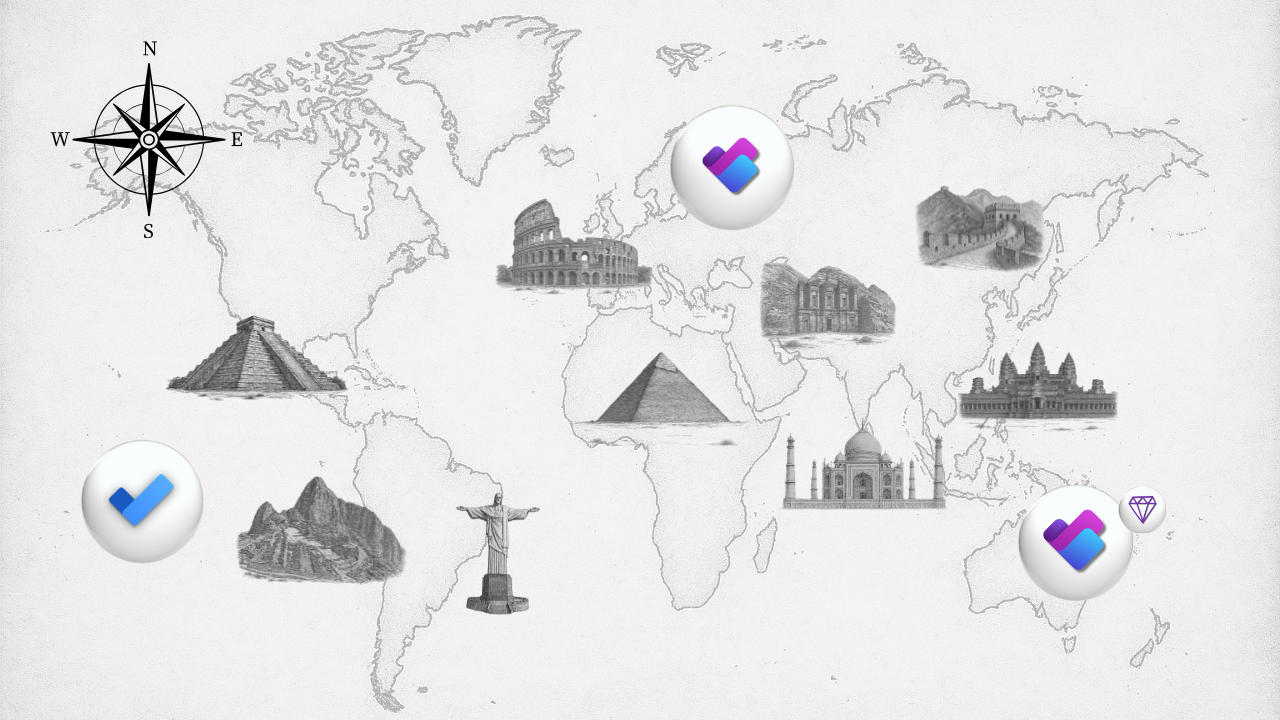
Training Journey Highlights
📍 Christ the Redeemer — Microsoft To Do
📍 Machu Picchu — Planner for Personal Use
📍 Pyramids of Giza — Planner Plans
📍 Colosseum — Sharing Plans
📍 Petra — Managing Plans
📍 Taj Mahal — Planner Premium
📍 Great Wall of China — Managing Premium Plans
Align Task & Project Management.
🔵 Enroll Now


How Group Training Works
Live via Microsoft Teams. Interactive. Beginner-friendly.
Designed to help your team build confidence and alignment in Microsoft 365.

Duration:
Approx. 4.5 hours
Sessions are scheduled for 4.5 hours and can be divided into 2 sessions (2.5 hrs & 2 hrs). Total duration may vary depending on your team’s needs.

Group Size:
Small to medium size teams
Standard session rate includes 10 team members. Larger teams can be accommodated by splitting sessions or customizing the format.
Resources Included:
Session guide and recording
Each session comes with a downloadable session guide and full recording, so your team can revisit key takeaways anytime.

"Amy you are amazing. I'm an instructor myself and I love and appreciate your instructional style."
Michel W.
Who This Course Is For
🔵 Business professionals who want a clearer task system
You’re ready to make Planner your central place for tasks.
🔵 People unsure which Microsoft 365 task tool to use
You’re ready to understand how the tools fit together.
🔵 Learners who value structure and collaboration
You’re looking for hands-on training that’s relevant to your team setup.
Whether you're just getting started or looking to improve how your team manages tasks — this is for you.
🔵 Enroll Now
Turn scattered tasks into a shared workflow.
🟡 Get StartedHow to Book Your Group Training Session
Step 1: Submit Your Inquiry
Share a few details about your team and training goals.
Step 2: Tailor Your Session & Receive a Quote
We’ll customize the training to your needs and provide a quote.
Step 3: Schedule Your Session
Choose a date and time that works for your team.
Step 4: Complete Payment
Secure your booking with easy online payment.
Participate via Teams and get your session recording and guide for ongoing learning.
🔴 Over 3 Million Views On YouTube

👋 Meet Your Instructor
Hi, I’m Amy — founder of Office Skills with Amy.
I BELIEVE TECHNOLOGY CAN EMPOWER US.
That belief drives everything I do — from simplifying Microsoft 365 learning to helping teams navigate apps with confidence, increase productivity, and reclaim their time for meaningful work.
With a background in financial planning, process improvement, and Microsoft Teams rollouts, I’ve seen firsthand how the right tools — used the right way — can transform the way we work.
👉Read my full story and meet Roo, my trusty office sidekick 🐾
Book Your Group Training Session
Frequently Asked Questions
Is this session beginner-friendly?
What apps are included in the session?
Will we receive a recording?
Can we customize the session?
How do we book a session?

"You are unique in the way you explain difficult technical topics in very simple, easy to understand, language."
Zul J.